Introduction to schedulR & this manual
schedulR is the investor engagement platform, we built to reduce the tedious admin and data work that is part
of all investor relations activity.
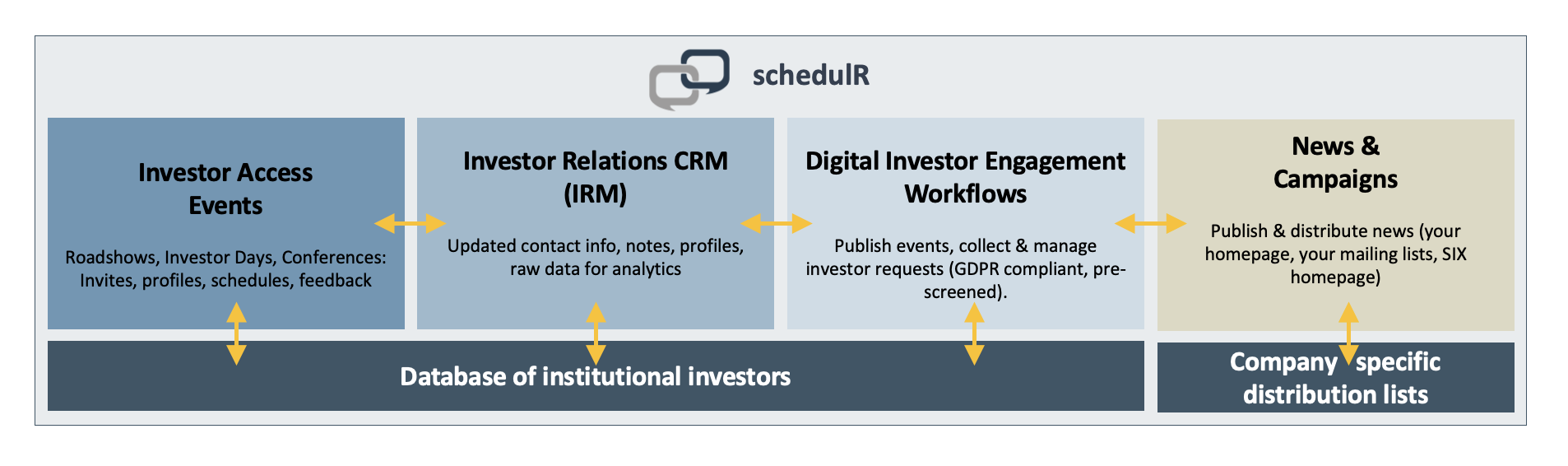 Figure 1 – schedulR overview
schedulR has three different access points:
Admin, is in charge of database maintenance & quality (high-level investor information) and user
management, permissions and support. An Admin user (with limited permissions) might also organize events
for corporates (single company events).
Investor, books meetings and provides feedback, mostly without actually logging in.
Corporate, can – depending on SLA - view schedulR events, add events to SIX & own corporate calendar, set-
up, edit and organize own events, add non-schedulR interactions, add meeting notes, distributes news, and
generate and use links for investor requests,
This manual only covers the functionalities available to Corporate users. It is organized by processes / functions
(How to ….?) that are grouped into the following sections:
- Section 1: Introduction (i.e. this page)
- Section 2: Getting started – General information affecting all modules
- Section 3: IRM - How to search investors and add interaction notes – Simple IRM functionalities
- Section 4: IRM - How to segment your investors – Sophisticated functions
- Section 5: IRM - How to add ownership data
- Section 6: IRM - How to analyze your data
- Section 7: Events – How to create and edit your own events, including 1-click-booking
- Section 8: Events – How to view and download documents (schedules, profiles, feedbacks)
- Section 9: News & Mailing – How to distribute company news
- Section 10: Mailing: How to create and maintain mailing lists, segments and sign-up forms
- Section 11: Mailing: How to create personalized campaigns, 1-click-booking links
- Section 12: SIX – How to add events to the SIX Events calendar
- Section 13: Calendar Notifications - How to manage and customize
- Section 14: SIX – Investor Request functionalities in the SIX calendar explained
- Section 15: Investor Requests on schedulR – Link generation, use cases and display
- Section 16: Service Center
- Section 17: Contact information
Please note that the screenshots for this manual are always taken for a user with highest SLA/permission level.
This means e.g. if you only have access to ‘IRM module’ you might have less menu items (and sometimes less
columns and buttons), but the key elements highlighted in the respective screenshot will be available for you
in any case.